Privacy: what the app sends
The short version: nothing about you is sent to us. There’s no account to make, no sign-in and no usage tracking in the app. It only goes online for a few things, each one listed below. Your counts and picture are only looked up when you ask (or once a day if you turn on Auto-fetch once a day). The update check, the store’s product list and the weekly license re-check happen by themselves when the app starts.
At a glance
Section titled “At a glance”| What | When | Goes to | What’s sent |
|---|---|---|---|
| Follower and subscriber counts | When you press Fetch counts or Fetch instead, or once a day if you turn on Auto-fetch once a day | Each platform, or a free lookup service for some (listed below) | Your handle (for Discord: your invite code) |
| Your channel picture | When you press Get it from …, and once a day with Auto-fetch if you got your picture that way | The platform, or a free lookup service | Your handle |
| License key check | When you enter a key, then about once a week | Gumroad | The product ID and the key |
| Update check | Once each time the app starts | Our download server (downloads.streamui.fun) |
Nothing about you |
| The Store | When the app starts, and when you open the Store tab | Our website (streamui.fun) |
Nothing about you |
Like any web request, each of these also shows your IP address to the site it goes to. That’s how the internet works, the same as visiting a website.
Nothing is sent to us
Section titled “Nothing is sent to us”Your channel name, handles, counts, picture, element changes, license keys and settings never go to Stream UI. The app does download the store and the update information from our servers, just like a website loads, but it doesn’t send anything about you or how you use the app.
Follower counts and pictures
Section titled “Follower counts and pictures”Counts and pictures are optional. The app only looks them up when you ask:
- you press Fetch counts, or Fetch instead on one row;
- you press Get it from … (for example Get it from YouTube) next to your channel picture;
- you turn on Auto-fetch once a day. It’s off until you switch it on. Then, each day, the first time you open the app, it refreshes your counts, and your picture if you got it with Get it from …. A picture you uploaded is never replaced.
Only your handle is sent (for Discord, only your invite code). No login, password, cookies or keys. The app looks these up in a separate browser session that’s thrown away when you close the app, so nothing those sites set is kept.
| Platform | Your count is read from | Your picture comes from |
|---|---|---|
| YouTube | YouTube | YouTube (backup: unavatar.io, a free lookup service) |
| Twitch | ivr.fi, a free lookup service (backup: decapi.me) | Twitch, found through ivr.fi (backup: decapi.me) |
| Kick | Kick | Kick |
| TikTok | TikTok (backup when TikTok is busy: countik.com) | unavatar.io |
| X | fxtwitter.com, a free lookup service (backup: vxtwitter.com, which can be a few days old) | unavatar.io |
| Not offered | ||
| Not offered | ||
| Snapchat | Snapchat | Not offered |
| Discord | Discord (only your invite code) | Not offered |
You can see the same list for your own handles in the app: open the Your channel panel (click your profile chip in the top-right corner) and expand What we send, and to whom under Followers & subscribers.
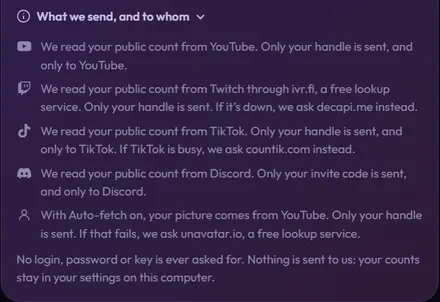
What you get back stays on your computer: counts in settings.json, your picture in the profile folder. See Your files.
License keys
Section titled “License keys”Unlocking a pack from its .zip happens on your computer. Some packs also need a license key. For those:
- When you enter the key, the app sends the product ID and the key to Gumroad (
api.gumroad.com) to check it. Nothing else. - About once a week, when the app starts, it quietly checks again. That’s how a refunded purchase gets locked. If Gumroad can’t be reached, the pack keeps working for up to 30 days.
- The app keeps the key, the purchase ID, how many times the key was used and a hidden version of your email (like
j•••@gmail.com) on your computer. They’re encrypted by Windowsyour Mac's Keychainyour system keyring (like GNOME Keyring or KWallet), so they only work for your user account on this computer. On a Linux desktop without a keyring, the app can’t encrypt them, so it keeps them unencrypted in your data folder.
Nothing about your key or purchase is sent to us.
App updates
Section titled “App updates”Once each time the app starts, it downloads a small file from our download server that says which version is the newest. Nothing about you is in that request. The new version itself only downloads when you click the update button, and the app checks the file is really ours before it runs it. See Update the app.
The Store
Section titled “The Store”- The Store tab shows our website, streamui.fun, inside the app. When the app starts, it also downloads the store’s product list, so it knows which packs the store sells and can tell you when a pack has an update. The website’s own privacy policy applies to it: it uses no tracking cookies.
- The app tells the store page which packs you own, so it can show OWNED on them. This happens inside the app window.
- Buying happens in your web browser, on Gumroad’s checkout. Gumroad handles your payment and email address under its own privacy policy. The app never sees your payment details.
- While the app waits for a purchase, and when you click Restore purchases, it looks for your unlock file in your Downloads folder. That check happens on your computer; nothing is uploaded.
What stays on your computer
Section titled “What stays on your computer”- Your channel: name, handles, counts and picture.
- Your changes to every element, your copies and the pictures you upload to elements.
- The packs you unlocked.
- Your downloaded videos. They’re made on your computer and saved where you choose.
- Your OBS connection. The app talks to OBS through OBS’s WebSocket server, normally on your own computer, and stores the OBS password encrypted by Windowsyour Mac's Keychainyour system keyring. Without a keyring, the app doesn’t save the password at all, so you type it again next time.
All of it lives in your data folder: Your files, backups and uninstalling shows what’s where.
On stream
Section titled “On stream”The elements you add to OBS run inside OBS, not in the app. Free elements just play their animation. Live widgets from packs (like a chat box or a goal bar) show your real chat and goals on stream. In OBS (or another app’s browser source), they connect to Twitch whenever their source is loaded, not only while you’re live. They join the public chat of the Twitch channel in their settings without signing in, like a viewer who isn’t logged in. No login, password or key is used. To show your channel’s own sub and bits badges, they also ask ivr.fi, a free lookup service, for your channel’s badge list; only your channel name is sent. Some emote and badge pictures load straight from Twitch. Inside a StreamElements overlay, they don’t join Twitch chat or ask ivr.fi: they get their chat and events from StreamElements instead. In the app, live widgets only show demo data.
Questions?
Section titled “Questions?”Email [email protected]. We reply within 24 hours, Monday to Friday.